


CyDelete – Uninstall Cydia packages from SpringBoard!
Author: Dustin Howett // Category: Apps, Jailbreak
Since the dawn of Cydia, users have been struggling to remove applications they’ve installed with it. Uninstalling a package is a seven-step operation at best: Start Cydia, Manage, Packages, (locate package), Modify, Remove, Confirm.
With the advent of CyDelete, however, Cydia packages can now be removed like any App Store applications- hold down the icon, wait for them to start wiggling, and tap the X. What was once cumbersome is now integrated into the standard iPhoneOS workflow. It is a lightweight MobileSubstrate plugin that only does anything in Wiggle Mode.
CyDelete will not remove applications that are not managed by Cydia, though they will be branded with an X. From SpringBoard’s standpoint, applications managed by Cydia and applications just sitting in /Applications are one and the same. CyDelete will also not remove Cydia itself, for safety reasons.
Without further ado, some screenshots!
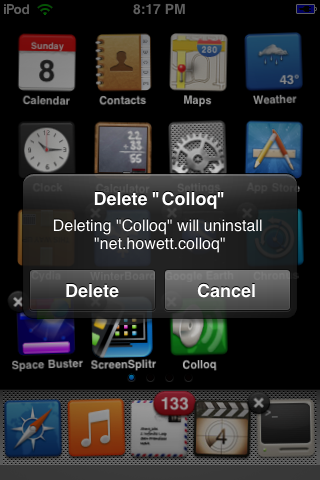
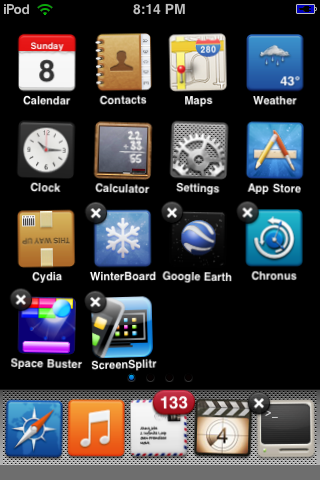
With the release of 1.0.0, it is expected that some uninstallations may fail, and that some packages may incorrectly be flagged as removable when they’re not, and not removable when they are, and that there will be crashes. For that reason, there is a “Bug Report” link available on the Cydia information page for CyDelete. Please submit any failures you encounter. Here is the link.
BigBoss Authors: Mark Bruce & Kory Lee
March 25th, 2009 at 1:29 am
This is an awesome app, These features should of been in cydia to begin with!
A+ Dhowett you’ve outdone yourself
CHeers
March 25th, 2009 at 3:04 am
Really really awesome! As Mathew said, Saurik should add this by default to Cydia.
It works fine without problems, like you try to remove an Appstore App, no more extra opening Cydia (and syncing) to remove Apps.
Love it Dustin, great work! !
A must have for every jailbroken iPhone/iPod Touch
Can somebody tell me the file-name to skin the remove “X” ?
Thanky
March 25th, 2009 at 3:09 am
Mathew & blatz: Thanks!
blatz: It’s a 30×29 image in SpringBoard’s bundle called “closebox.png”. :)
March 25th, 2009 at 3:18 am
thank a lot Dustin :-)
March 25th, 2009 at 4:25 am
yep awesome, i agree you should talk to saurik abouy this being integrated with cydia in future releases
March 25th, 2009 at 5:01 am
It’s over 9000!!!!
March 25th, 2009 at 5:12 am
what theme is that you are using in the screenshots?
March 25th, 2009 at 5:35 am
Gradiance v3.3 Icons + Matte UI 1.1 (Aqua Variant) + Coloured Status Bar Icons
Thanks for the support :)
March 25th, 2009 at 5:35 am
It’s over 10,000! But that’s not as funny.
March 25th, 2009 at 5:53 am
This has already been made by gojohnnyboi, called QuickDel, already on Cydia. Does the exact same thing, good job you copied an app.
March 25th, 2009 at 5:58 am
The fact of the matter is, “Master”, that I wrote the code for CyDelete before Gojohnnyboi wrote his implementation. We were originally working AS A TEAM. You have NO idea what you’re talking about.
Just because you have a vested interest in appstore development with him does not mean that you need to play his bitch.
He decided to stick with 3.0.
Also, if you’ll note, his quikdel package uses some of my scripts, from previous revisions of CyDelete, when it was called QuikDel.
March 25th, 2009 at 5:59 am
As for working as a team; He told me I could release the code since he moved on to 3.0.
March 25th, 2009 at 7:57 am
EXCELLENT work with this! Uninstalling was really my only gripe with Cydia and this completely fixes that. Thanks!
March 25th, 2009 at 8:27 am
Excelent work Dustin. Will be great if you can unmark all un-removeable apps. Thanks
March 25th, 2009 at 9:02 am
This app is amazing, very much needed.
A really cool addition would be to allow the hiding of any app as SB Settings does through poof. (ideally appstore and cydia of course)
March 25th, 2009 at 9:59 am
Excellent work!
March 25th, 2009 at 11:26 am
One simple question: Will it run in the background and take up memory?
So long I’m loving it. Thanks!
March 25th, 2009 at 11:36 am
It might take up a nominal amount, but just so that it might spring into action whenever you need it. It’s rather lightweight, even with the new translation code I’m adding. :)
March 25th, 2009 at 12:24 pm
Great addon – thanks so much for this!
March 25th, 2009 at 3:53 pm
Wow someone got a little defensive when I mentioned that he stole an application. Oh because you little prick, you DID. You have the EXACT same app that does the EXACT same thing, and you released yours a good week after him. bitch
March 25th, 2009 at 4:20 pm
You’re entitled to your own opinion, you little asshole.
March 25th, 2009 at 5:44 pm
Hello. I tested this great app and found out that Cydelete does not distinguish between apps that need a respring after uninstallation and those who don’t. It just deletes the application and the icon.
March 25th, 2009 at 6:24 pm
It’s supposed to distingiush between them, unless the respring is caused by a dependency on something else (such as MobileSubstrate). I specifically added this feature.
March 25th, 2009 at 6:25 pm
Could you tell me which package it is? Thanks!
March 25th, 2009 at 7:12 pm
I tried biteSMS. Thanks for the quick reply.
March 26th, 2009 at 1:31 am
I’ll concur. It is very light weight. It does not “run” in the background as it is a mobile substrate add-on. This means it becomes part of your springboard process. It seems to be taking less than a MB of RAM. I have it installed with no noticeable loss whatsoever. I recommend!
March 27th, 2009 at 9:11 am
This is not stolen code. I have talked with Gojohnnyboi about this release prior to publishing it. He was fine with it.
In addition, Gojohnnyboi’s version is not released. If it is released on some private, beta repository that no one has installed, that doesn’t count for release. Nor does announcing something in a forum.
March 27th, 2009 at 11:47 am
For me … it has never ever worked.
March 28th, 2009 at 11:30 am
This is a wicked addon, great work. Only problem i notice is that “uninstall” is typo’d as “unintall” on english.lproj :)
March 29th, 2009 at 3:37 am
Hi,
Curious to know – where can I find “colloq”? I’ve been waiting for it since the 1.x days
March 30th, 2009 at 1:09 am
any one seen any battery drainage using cydelete?
March 30th, 2009 at 11:13 am
Anyone else having an issue getting to the bigboss repository? Might just be my connection but I can’t get any packages to show up on my iphone right now.
March 31st, 2009 at 12:16 am
In Cydia at http://howett.net/cydia
(HowettNET in the More Sources list)
It’s not the colloQ from the olden days, however.
April 7th, 2009 at 5:30 am
I’ve been trying to get this working for me.. but i cannot see the “x”. Tried a lot of apps but doesn’t work.
removed it, updated it, reinstalled… nothing works :(
April 9th, 2009 at 10:56 am
Can somebody list the dependencies installed with this please, im having problems with crashing and am going to start from scratch :(
April 9th, 2009 at 10:57 am
Sorry I take that back, its all fixed now, brilliant app btw, very useful!
April 12th, 2009 at 10:49 pm
Thank you! :)
April 16th, 2009 at 6:13 am
Also fixed here. Installed Winterboard and i guess that installed the dependencies for it.
April 22nd, 2009 at 10:46 am
This is a very great app! It was one of the first apps I installed after my first jailbreak, and I’ve had it ever since! Thank you :)
May 1st, 2009 at 11:56 pm
Good job biasaaaach!!!
June 19th, 2009 at 10:52 pm
What should i do?I’ve been trying to get this working for me.. but i cannot see the “x”. Tried a lot of apps but doesn’t work.pls help..or give me link related with this problem
June 19th, 2009 at 11:49 pm
Check for other extensions installed, I know there’s at least one that interferes with the (x)s; Unfortunately, I don’t know which it is off the top of my head.
June 24th, 2009 at 12:37 pm
thanks for this
July 26th, 2009 at 10:02 pm
Just a warning if it applies to anyone else — I installed this on a more or less freshly jailbroken (redsn0w) iphone 3g 3.0; and the moment it finished installing, the iphone rebooted to the apple logo and wouldn’t turn on. After a few home/power resets it did turn on. The first thing I went to do was uninstall cydelete from cydia, but when I tried, it was no longer in the packages. I’m not exactly sure what happened, I have only a few packages installed and nothing that would seem to be troublesome (with the exception of appsync); but just wanted to give a heads up.
July 26th, 2009 at 11:44 pm
After installing MobileSubstrate for the first time, there are some issues reloading SpringBoard. A reboot fixes it. It’s a one-time thing, and it is related to a failure on Apple’s part. There is nothing I can do about it.
Please search for the right culprit next time. :(
August 4th, 2009 at 4:31 am
iv tried to search for the location of the cross on the cydelete as i want to change it for the one i currently use in my skin.
can anyone direct me to the exact location?
August 26th, 2009 at 6:30 am
Hello, i just jailbreaked my iphone 3G to OS 3.0
I was trying to install cydelete and it is not working, although it was working fine on the 2.2 firmware.
i am getting this note from cydia:
“the requested modifications cannot be applied due to required dependencies or conflicts that cannot be automatically found or fixed.”
please help!
September 9th, 2009 at 7:23 pm
Hi
I LOVE this app, but there’s one thing I can’t figure out. People have said you can theme the X that shows up on the icons, but I can’t figure out how to. I’ve WinSCP’d into every file to try and replace the Icon and can’t find it. BTW i’m using Glasklart. Any help would be GREATLY appreciated
Wm
PS Thx in advance
September 9th, 2009 at 7:26 pm
also, every file that I find called “closebox.png” ends up being the file that I WANT the icon to be, not the one it shows up as
November 7th, 2009 at 10:23 am
Hello, I have deleted a webapp with CyDelete previous version. Now I’m without Web.App . How can I restore it? Thank you for the help.
November 7th, 2009 at 11:42 pm
Excellent blog thebigboss.org well done and I am really pleased to view : this it’s just what I needed to know. I shall be very pleased to become a regular visitor
Thanks and well done!
November 8th, 2009 at 2:34 am
P.s. For Web.App is intended the folder /Applications/Web.app in my iPod Touch (os 2.2). Can someone upload a zipped copy of 2.2′s folder plz? Thx
November 19th, 2009 at 10:56 pm
I just installed cydelete and it froze my phone, I went to uninstall the app seeing of thatwould fix the issue and I can no longer launch cydia, I would like to have the app work and be able to launch cydia, but I don’t know how to uninstall cydelete, is there some way of getting rid of it using winscp or something like that?
Please help asap
w473r801@gmail.com
January 2nd, 2010 at 12:31 pm
i need help
plz someone help me
plz
i deleted installer with cydelete and now i cant reinstall it
can i get around this
if u can solve this ur a genius and it would be helpful
plz and thanks
February 6th, 2010 at 8:01 am
cant uninstall BiteSMS either, its just deletes the icon and comes with an error. the bitealert icon in sbsettings ar still there.
February 24th, 2010 at 12:50 pm
Help me plz… I just deleted cydia using cydelete
But when I try to install cydia again via blackra1n it downloads, unpacks and resprings but cydia icon does not show??? Running 3gen iPod touch 3.1.2
July 23rd, 2010 at 12:14 am
thanxxxxxxxxxx
August 11th, 2010 at 4:52 pm
Where do I download it? :(
October 26th, 2010 at 10:43 pm
Where do we download it? :(
December 5th, 2010 at 1:10 pm
I tried to delete cydia using cydelete and it removed the icon but failed to remove cydia obviously bc when I go to my setting cydelete is sitting right there:( I need help!!!
January 22nd, 2011 at 11:32 am
Hi guise,
After installing cydelete on a 3G iOS 4.2.1, springboard keeps crashing and now Im stuck in safe mode. Could someone please state what extensions/packages/dependencies are installed together with cydelete? I remember 2 pkg installed after selecting cydelete, and it keeps crashing after removing cydelete pkg. Thank you in advance!
January 23rd, 2011 at 8:08 pm
Nevermind, I fixed it by removing ReflectiveDock.
February 8th, 2011 at 10:47 am
same problem here
February 8th, 2011 at 7:24 pm
Look at the date man…lol
March 14th, 2011 at 7:32 am
Umm one question what if u delete cydia???
June 2nd, 2011 at 5:53 pm
Just stumbled upon this wonderful article.This is extremely exciting.I’ve bookmarked it and will come back routinely.Hope to see more such articles.file_links\xrumer_resource\km_sig.txt,1,L]
June 7th, 2011 at 9:32 pm
Just stumbled upon this wonderful article.This is extremely exciting.I’ve bookmarked it and will come back routinely.Hope to see more such articles.file_links\xrumer_resource\hl_sig_ibuyherveleger.com.txt,1,L]
June 15th, 2011 at 1:48 am
Reboot your phone
June 17th, 2011 at 11:00 am
Thkkkkkkkk
July 11th, 2011 at 9:36 am
Hi guise,
After installing cydelete on a 3G iOS 4.2.1, springboard keeps crashing and now Im stuck in safe mode. Could someone please state what extensions/packages/dependencies are installed together with cydelete? I remember 2 pkg installed after selecting cydelete, and it keeps crashing after removing cydelete pkg. Thank you in advance!
August 5th, 2011 at 8:34 am
Excellent blog thebigboss.org well done and I am really pleased to view : this it’s just what I needed to know. I shall be very pleased to become a regular visitor
Thanks and well done!
August 5th, 2011 at 8:36 am
This is a very great app! It was one of the first apps I installed after my first jailbreak, and I’ve had it ever since! Thank you
August 5th, 2011 at 8:38 am
i agree you should talk to saurik abouy this being integrated with cydia in future releases
August 6th, 2011 at 12:57 am
A few of the authentic and reliable providers range from the Pragati Businesses which manufacture and export metal finish covers, die cast automotive parts, tool holders and bearing NFL caps.
August 6th, 2011 at 12:58 am
If you are looking at juicy tracksuits on purchase in juicy couture purchase here, please do something! Many more clients believe the standard of Juicy Couture Outlet tracksuits.
August 6th, 2011 at 1:00 am
They’re near to in several colors, affordable karen millen apparel and dimensions.The Karen Millen distinct dark on dark Tote is strictly what you should be moving should you ever walk-while using entrance doorways within the party.
August 17th, 2011 at 11:38 am
I think that this tool is amazing. Thanks for sharing with us. Honestly, before I was not that involved in it. Keep up the good work.
September 19th, 2011 at 7:05 am
Please help cydelete deletes the app but it reappears when i respring >> Driving me InSAne!
October 4th, 2011 at 11:33 am
nothing much to say really…. new here, and wanting to learn more about this place…. i like to meet new people and enjoy life..
i am starting a business for companies that are new to social networking. If you would like to have all of your employees registered to facebook, twitter, myspace, and all the rest then contact me.
We Use some programs like Xrumer and it is similar to an Xrumer Blast, but is white hat and once registered real people use the accounts to promote your business.
FORUM OWNERS LOVE THIS!!! We bring real members to their sites and contribute to their content and income!
October 5th, 2011 at 3:52 am
Joyland casino is driven by Playtech, the foremost software provider that popular in offering casino system that supports live merchant matches. The Joyland’s are living vendor matches are streaming from a land-based casino positioned at Philippines. It’s got 4 sorts of dwell video games: Dwell Blackjack, Dwell Roulette, Are living Baccarat and Are living Sic Bo. One great point about this casino is it provides a $25 no-deposit bonus for new participant to try out their casino video games. You may take the benefit of this provide to test engage in its dwell casino video game titles.Negative news for USA players that are searching for Are living Vendor casinos, you won’t find any of on the web casinos that assist real-time are living matches will accept avid gamers from USA. I guess the US gamblers must go to land-based casinos if they truly desire to enjoy the exhilaration of playing which has a actual seller.
October 5th, 2011 at 3:53 am
Dublin Wager casino delivers stay dealer video games employing VueTech software program, the pioneer casino computer software supplier in offering up casino platform that assistance webcam streaming to supply stay game titles at on the internet casinos. The casino computer software is presented inside a no-installation format; you just need to obtain a modest java file which is often carried out in a few seconds. The dwell game titles include real-person dealers are provided in Blackjack, Roulette, Baccarat and Poker.
October 5th, 2011 at 3:54 am
Just like Bet365, the web site is operated as being a sportsbook that allows the betting not simply on casino video games, but additionally other sports tournaments. The Ladbrokes Casino utilizes the software from CWC Gaming Group to electrical power their stay vendor casino, while other traditional matches are powered in Microgaming platform. Each application providers are among the the recognized leaders in the online gambling sector. It is possible to participate in the real-time game titles with reside sellers in Blackjack, Roulette, Sic Bo, and Baccarat at Ladbrokes Casino.
October 7th, 2011 at 1:03 am
Excelent work Dustin. Will be great if you can unmark all un-removeable apps. Thanks
October 11th, 2011 at 9:32 am
Miss Xu t?nkte denne type ser har reduceret k?be igen. “Pludselig osv. St?rre end en m?ned, snakke med Canada Goose Trillium nyt?rsdag store forfremmelse, gemme bare ramte en prisneds?ttelse p? 12% rabat, eller endda mere end 600 yuan for at k?be! Inch
October 14th, 2011 at 5:43 am
it is a good article for us ,i have been find everywhere for this kind of point ,and now i find ,tks for the ownner to shar this kinds of article with us .tks so much.for the inner of the dwon jackets ,there is duck downs inside ,it is very nice to keep warm for urself.which one is the best winter down jackets or down coat,pls see our link ,then u will see.yangchengbin/201110
October 16th, 2011 at 2:18 pm
pls see our link ,then u will see.yangchengbin/201110
October 24th, 2011 at 3:07 am
Saints coach Sean Payton got the contract extension
Sean Payton attributes a brand name new agreement that offers him an opportunity to make his first NFL mind coaching role a decade-longgig. Loomis mentioned the top workplace was self-confident Payton wished to sustain what he has assisted develop in New Orleans instead than start much more than somewhere else yangchengbin/201110
November 6th, 2011 at 8:45 am
Hi there, I discovered your website via Google at the same time as looking for a comparable matter, your web site got here up, it appears to be like great. I have bookmarked it in my google bookmarks.
November 19th, 2011 at 7:57 am
Jonathan Goff will miss the season in this years
Because inside the torn anterior cruciate ligament Jonathan Goff will pass up the eason on this years.
Lastweek, and all told, they’ve lost five key people inside the defense for the period of time granted that instruction camp opened.New York opens the period of time against the Washington Redskins on Sunday.
Goff,in his fourth period of time using the Giants away from Vanderbilt, suffered the injury all through Monday’s practice. He experienced 80 tackles plus just one sack final season,since the Giants completed 10-6.yangchengbin/201111
December 3rd, 2011 at 11:35 am
Hi there, I found your blog by means of Google even as looking for a comparable matter, your web site came up, it looks great. I have bookmarked to my favourites|added to bookmarks.
December 21st, 2011 at 2:24 am
Thank you for the auspicious writeup. It if truth be told used to be a amusement account it. Glance complicated to far brought agreeable from you! By the way, how could we communicate?
January 2nd, 2012 at 5:49 pm
unable to delete “myprofiles” via cydia and cydelete coz cydelete doesn’t work in ios5.0.1.help me please i get stuck in safe mode.thanks!!
January 4th, 2012 at 5:26 pm
hello!,I love your writing so much! percentage we be in contact extra approximately your article on AOL? I require an expert on this house to solve my problem. May be that’s you! Looking forward to peer you.
January 4th, 2012 at 11:21 pm
Hello there, I found your web site by means of Google whilst searching for a similar topic, your website got here up, it looks great. I have bookmarked it in my google bookmarks.
April 1st, 2012 at 10:54 pm
version 2.0.5-1 of CyDelete in attempt to uninstall app in iOS 5.1 freezes ipad for few minutes, then restarts springboard. no uninstal.
any solutions?