



 I have been working on a new FREE app called “BossPaper”. This is a very configurable advanced wallpaper app that lets you control what wallpaper shows up on your SpringBoard. You may be saying, “But Winterboard does that!” Sort of, but not like this. BossPaper can work with Winterboard (or without). Read on for details.
Last year, Saurik released Winterboard. This enabled some new features none of us have ever seen before such as rotating desktop wallpapers via Javascript HTML pages. While this was revolutionary for us iPhone owners, it also came at a cost. Performance running these themes sucks. There are a few ways the Javascript based images can be implemented and all of them have problems. If you load them all into memory, Springboard uses a signficant amount of memory. If you fade them, Springboard uses a lot of CPU. Javascript is very memory / CPU heavy. In addition, the Javascript runs behind all applications and while applications run. This impacts performance heavily and causes apps to lag even while you’re using them and not on SpringBoard. In addition, the script continues to run even while the iPhone is locked draining battery.
I have had it on my list to solve this for a while. The result is BossPaper. BossPaper is an advanced wallpaper manager that puts total control of wallpapers into your hands. BossPaper has these features:
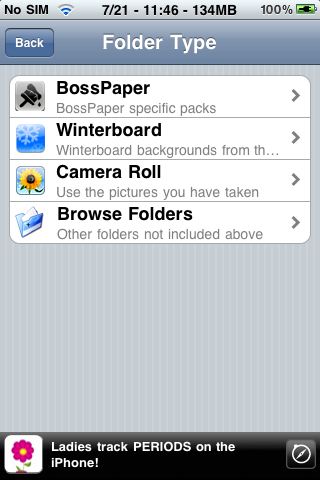
- You control which images are displayed. You can use camera roll, installed themes, or a combination of! With Winterboard, you could only install a theme and use what came with it. Now you can use images from many themes or other sources such as BossPaper packs.
- You can use your own images from the camera!
- BossPaper stops rotating images as soon as an app launches. This prevents battery and CPU drain.
- BossPaper stops rotating images as soon as the iPhone is locked. This prevents battery drain.
- BossPaper uses very little memory and CPU! It does not inject into apps only SpringBoard so you should not notice any application lag running it.
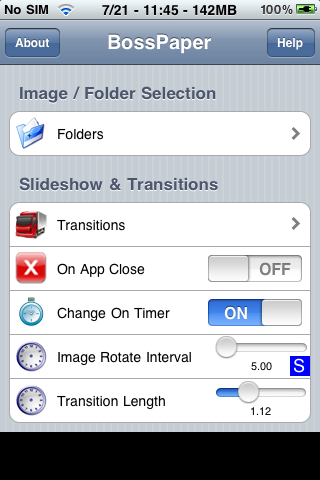
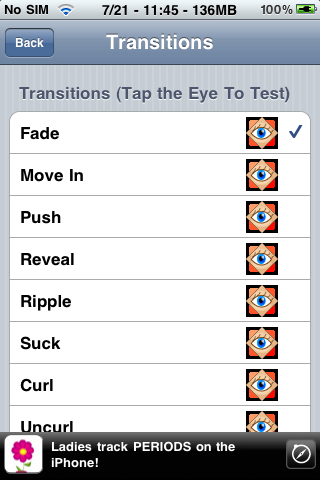
- BossPaper can use one of many transitions such as fade, water drop, page curl – you configure which one(s) you want. Configure how long the transitions last.
- BossPaper lets you control when to rotate images. You can rotate it on a timer you configure or you can rotate when an app closes, or both!
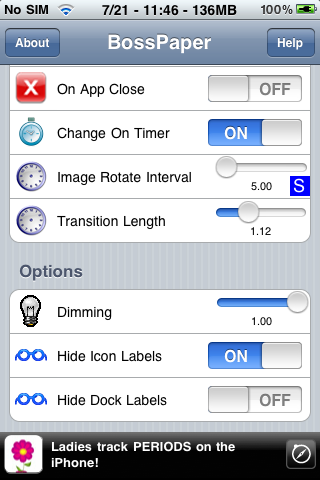
- BossPaper lets you hide icon labels so those that do not want to install Winterboard can use it without.
- BossPaper lets you dim the wallpaper.
Here are some screenshots of the “in progress” configuration app:
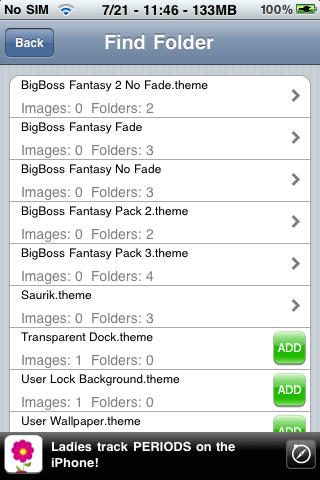
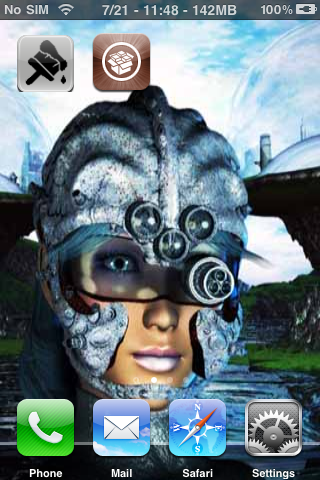
I plan to release a beta of this app in the next couple days in Cydia. Keep on the lookout.
BigBoss Authors: Mark Bruce & Kory LeeTags: BossPaper, Themes, Winterboard
July 22nd, 2009 at 1:02 am
Very nice wirk, thanks !!!
July 22nd, 2009 at 2:24 am
Nice one,
can you install your own Walls by ssh etc
July 22nd, 2009 at 4:00 am
Definitely
July 22nd, 2009 at 4:06 am
Man, u really r one of the best hackers around, and u do it all 4 free.
Keep up the GREAT work!!!
July 22nd, 2009 at 4:21 am
Sounds awesome, can’t wait
July 22nd, 2009 at 5:20 am
So this will replicate the wallpaper feature of winterboard but be less performance intensive as it only injects into springboard.
That sounds awesome as all I use winterboard for is the wallpaper. ;)
July 22nd, 2009 at 5:31 am
any support for vwallpapers? my phone becomes unusable when i use theme with winterboard
July 22nd, 2009 at 5:36 am
What I would LOVE would be a per-page wallpaper feature. Have it let you choose what wallpaper for each page of the SpringBoard. I would PAY for that!
I like having per-page wallpaper themes, but those aren’t really something you can make on the go.
TIA for this app!!
July 22nd, 2009 at 5:40 am
OMG!!!
Thaks to the heaven!
I didnt wanted to install winterboard cause i wanted a fast iphone! But i was going to “make a mistake” till i saw this …
U r the man !
July 22nd, 2009 at 6:17 am
Wow, cool! Looking forward to it!
July 22nd, 2009 at 6:42 am
I may look into it. But there will be no way to do these with *good* performance.
July 22nd, 2009 at 7:57 am
Dude!!! Dude!!! This is great news this is the app I have been longing for! Thank You so much!
Just curious.
Will you be able to individually pick specific images in the folders you choose, or is it just the entire folder?
Also you mention the Camera Roll, but will the Photo Library be accessible as well?
Either way I am glad this App is on the way.
Thanks again for your hard work. This is really exciting. You rule Bro!
July 22nd, 2009 at 8:01 am
THANKS BIGBOSS
You are the Boss.
UNRELATED : :( new update from qTwitter Crashes the iPhone.
Please qTwitter fix that. !!!!!!
Mad face because i paid for it !!!! :(
32GB iphone 3Gs
July 22nd, 2009 at 8:02 am
I’d really like to see an option to change the wallpaper at certain ‘times of day’. This way you could have a paper for each of the 24 hours etc.
July 22nd, 2009 at 8:11 am
I want that so baddddddddd sweeet keep up the good work man , and btw I got some ideas for apps but don’t know where to address them , can anybody help me ?
July 22nd, 2009 at 8:55 am
Does this use MobileSubstrate?
July 22nd, 2009 at 9:00 am
Great XD
pd: the icon right now is kinda ugly with the “rough corners” :P (well, only when not using the default black wallpaper, what most wont use if they use this app xD )
July 22nd, 2009 at 9:29 am
just wondering i know winterboard is the theme app but will this be able to like say change icons or is it strictly wallpaper?
July 22nd, 2009 at 9:30 am
Excellent app idea.
Bigboss you really are a legend.
It looks really polished and well thought out which is what I like to see :-)
July 22nd, 2009 at 11:26 am
just what i was looking for. after the update to 3.0 i said screw it to winterboard. Thanks BigBoss!
July 22nd, 2009 at 1:00 pm
This is so cool, can’t wait to give it a try!
Thanks, BB!
July 22nd, 2009 at 2:14 pm
Little confused… does this app JUST rotate/transition wallpapers, or will it let me select and display just ONE wallpaper, if I wanted to?
July 22nd, 2009 at 4:31 pm
TIA —- doesn’t that mean “This is Africa” … lol maybe I’m wrong
July 22nd, 2009 at 5:22 pm
sounds great. in fact, i do feel those js use a lot of resource
i have one question: i use js for lockscreen only, do u think after unlock the screen, the memory still been taken?
July 22nd, 2009 at 7:23 pm
You could do that, too.
July 22nd, 2009 at 7:23 pm
Yes. It is always running.
July 22nd, 2009 at 8:00 pm
I second this… this way you can make an apps page with an apps background and a games page… almost like those iNav themes… this would be a cool idea
July 22nd, 2009 at 8:06 pm
I third that! Per-page wallpaper is the way to go! And the theme page idea is definitely cool.
July 22nd, 2009 at 8:06 pm
Im a little confused? so does this app run js?
I am using the multibar lockscreen theme which which gives weather/status notifier lockscreen updates. Other than that I only use winterboard for the springboard background and to remove the icon labels.
July 22nd, 2009 at 9:04 pm
I’m really excited to hear about this product. I would be willing to donate to help defray your time. Thanks for the great iphone utilities.
July 22nd, 2009 at 11:24 pm
really lookin forward to this. nice one BB.
July 23rd, 2009 at 2:08 am
i’m interested in if there will be option of “change on timer” for lockscreen background.
July 23rd, 2009 at 3:31 am
I have been waiting this for AGESSSSSSSSS!!!!!!!!
THANKSSSSSSSSSS that’s so nice!!!!!!!!!!!
July 23rd, 2009 at 7:11 am
This is awesome!!!!!
I’m just waiting!!!!
Thank you
July 23rd, 2009 at 11:49 am
I hope this comes out today… this app looks bad ass!
July 23rd, 2009 at 2:24 pm
U are genius !!! Thx We all Iphone users love u
July 23rd, 2009 at 8:54 pm
Will BossPage allow a transparent dock? That + wallpaper is the only feature I use of Winterboard. Sure would like to see the whole picture.
July 23rd, 2009 at 10:20 pm
Awsome dude. I will be looking forward to download it as soon as you release it. Great work!!. Now we can finally compare between Winterboard and Boss Paper. I got my eyes peeled !! Looking for Boss Paper, Boss Paper, Boss Paper, …..
July 24th, 2009 at 7:15 am
This app does not run javascript as that is against the spirit of enhanced performance. The goal was to rotate backgrounds *without* javascript. It will run your background and remove icon labels though.
July 24th, 2009 at 7:16 am
I appreciate the sentiment, but I do not accept donations.
July 24th, 2009 at 7:17 am
I’m not sure how yet, but I will have some way to have a transparent dock since that’s how I use the device also. (See my test screenshot in this post has transparent dock).
July 24th, 2009 at 4:14 pm
What’s the likelyhood of the app being released this weekend? :)
July 24th, 2009 at 6:28 pm
I just wanted to say thanks to you Big Boss. If it wasn’t for you and the dev-team I would still be paying some dude off of craigslist to rejailbreak my iphone. It amazes me at what you guys are able to come up with like this Boss Paper app wich I think is freakin ridiculously sick. I can’t wait for it to be released. Anyways, Props to you Big Boss, you are the shit!!!!
July 25th, 2009 at 5:36 am
Release date?
July 25th, 2009 at 6:22 am
I’m just waiting for the release. I wanna uninstall this ********** winterboard.
July 25th, 2009 at 7:06 am
when release?
July 25th, 2009 at 4:21 pm
I would just like to say thanks for making this app. It is clear that Winterboard has suffered somehow since 3.0.
5second application close times are quite common until Winterboard is disabled via SBSettings, so it is clear what is responsible. I seriously can’t wait for your app!
July 25th, 2009 at 5:54 pm
When can we expect it to be released? I’m dying to get my hands on this one…I’ve been checking cydia every half second :-D
Thanks Bossman!
July 25th, 2009 at 7:12 pm
BigBoss,
^^^^ See what happens when you promise something “in a couple days”? haha..
July 26th, 2009 at 1:48 pm
Nice work and I am looking forward to install it. Thanks for this. I have stopped using winterboard on my newly jailbroken iPhone 3GS. Just waiting for Bosspaper. Any date of release. Thansk
July 28th, 2009 at 9:29 am
Awesome BigBoss! Can’t wait to try it. I loved Winterboard’s appearance on my iPhone, but I couldn’t stand the sluggishness. Bosspaper should solve my skinning desires.
Hope it comes out soon.
July 28th, 2009 at 9:31 am
No you still need winterboard, who told you that winterboard makes your idevice slow
July 28th, 2009 at 6:22 pm
Would you take Hookers as a token of our appreciation?
July 29th, 2009 at 4:51 am
One more comment.
-If you remove the app in cydia SB settings still has Boss paper listed as a mobile substrate add on
-I made the dock transparant in bosspaper before removing and now my dock is permanantly transparant! (I guess I need to reinstall, revert it to normal and re-delete!)
July 29th, 2009 at 10:43 pm
Is it available yet? As I can’t find bosspaper???
July 30th, 2009 at 12:00 am
Two things:
1) I know you’re looking into using the wallpaper folder. For that folder, it will need to ignore all the thumbnails.
2) If you have several folders, and then delete one, the deleted one is still in play until bosspaper is restarted. It should unload that folder or reread the folder list upon a change to that list.
July 30th, 2009 at 5:55 pm
Does BossPaper allows you to change the background image in this two screens: when the phone is ringing and also during the phone conversation? If not, does someone know how to do it manually?
August 2nd, 2009 at 5:26 am
I’ve been “testing” bosspaper v0.93 for a while now. First of: I can’t wait for the final release. Fantastic program!
I would however like to point out a couple of issues you may or may not be aware of.
During the ripple transition (combined with fade, if relevant) just before the “ripple” occurs sometimes a little white speck flashes in the middle of the screen. Also one of my favorite winterboard plugins (“Springboard Clock – English”) is not visible when Bosspaper is active. The page indicator dots however are visible again when I remove “Springboard Clock – English” from winterboard (again, if relevant). Lastly I would like to suggest that the “Photo Library” of the iPhone be added to the usable folders (or I just don’t know how and/or can’t find it…).
I hope this helps (I know it’ll help me ;p) and kudos again!
August 3rd, 2009 at 2:40 am
Ehmm.. When?
August 6th, 2009 at 1:57 pm
Where can I get the 350 images that you rotate on your phone. Thanks
August 6th, 2009 at 4:13 pm
Disregard the last question. :)
August 7th, 2009 at 9:19 am
Just downloaded the app today and started using it…Man its just fabulous !!! I love it. One thing though is that I cannot seem to access the folder containing wallpapers…(any ideas?) Apart from that the app is just great !!! Well done me ‘ol matey…you are the best.
Regards
Shola
August 11th, 2009 at 1:54 pm
How do i do that pls..?
August 11th, 2009 at 2:46 pm
Really cool app , I would like something like this for lock screen.
August 11th, 2009 at 2:55 pm
Man,thanks for the great app but i will be very great if u will help me with a step by step process of how i can get my pics i have in folders to run as my wall papers,i’ve tried and tried but i can’t look those folder(my person pics i add/put on my iphone via iTunes) from the “image/folder selection” in the app.Thanks very much…
August 11th, 2009 at 4:12 pm
You can use your own images from the camera! ?
How about the photos that are sync from itunes/iphoto?
August 12th, 2009 at 6:42 am
I’m having the opposite problem. I have several folders in my wallpaper folder and none show up. How do I access the subfolders or the media folders subfolders?
August 17th, 2009 at 11:52 pm
Can Bosspaper not add photos from media folders?
September 1st, 2009 at 12:46 pm
how do i extend the picture image in the backround so it displays behind the icons at the bottom of the phone
September 2nd, 2009 at 3:15 am
I really love Bosspaper. Its great!
Is it possible to add “icon transparenz”. That would make Bosspaper a killer-app and i woudnt need laggy Winterboard anymore :)
September 5th, 2009 at 4:46 pm
I can access photos from the camera roll but I cannot find the directory that contain my photo library. Is it possible to access that folder with BossPaper?
September 6th, 2009 at 2:42 pm
well this app is ok! I understand that sometime it is hard to program applications to do certain things but It can be better…much better.
1. it should allow you to choose other picture folders in your photos rather than camera roll only.
2. it should view the photos rather than forcing you to tap on them. that saves you time from having to keep tapping an image just to see what it is.
what would be nice is if i could go to photos app and tap on the photo i want to add to the bosspaper app just like with winterboard.
but overall its ok…good job, but can be better.
September 6th, 2009 at 2:45 pm
hey i cant find my other photos that i got. it only gives me the camera roll folder. whats up with that???
September 6th, 2009 at 2:52 pm
Hi I would like to know how I can find the folder with all my other photos in them, that’s the one that I sync with my itunes. Can somebody please help me!!!!!!!!
September 6th, 2009 at 2:58 pm
Great app, i finaly got what I wanted after searching for so long. BossPaper rocks!
just one thing though it fails to show my picture folders that I sync with Itunes. I got some really cool pics that I want to use.
September 9th, 2009 at 2:27 am
Yes, the only thing that would make this app perfect would be the ability to use the Photo Library as a folder you can select. Other than that no gripes! Great job BB!!!
September 10th, 2009 at 6:15 am
nice app, the fade transition should be much more smoother i can see the frame counts and like what other ppl have said it needs to show you the itunes pic folders otherwise you would have to use the pics in your camera roll only.
Great app though!!!
September 14th, 2009 at 3:41 am
Yes, that would be a great feature!
September 18th, 2009 at 5:17 pm
Is there anywhere to get help for BossPaper? I can’t get it to find any of my synchronized photo albums. I hate how the iPhone forces you to put everything in “Camera Roll,” and I don’t want to clutter it with wallpaper or photos of contacts, so I created my own folders before synchronization. Unfortunately, BossPaper doesn’t find any of these folders – and furthermore, finds the system Wallpaper folder even though it doesn’t exist per iPhone “photos.”
October 27th, 2009 at 8:11 pm
Remove icon labels is not working (at least for me), after i updated my iphone 3g to version. i even removed winterboard no luck so far. Any ideas on how i can solve this issue. Modifying the .strings file and remove the name of the apps works but it’s not scalable at all. I used blackra1n to jailbreak.
Best regards,
November 1st, 2009 at 7:55 pm
I love this program! So many useful features, and without slowing down the system like Winterboard! Kudos to you!
One suggestion, can you write a sbsettings toggle for it so it can be easily and quickly turn on & off?
November 4th, 2009 at 2:47 am
Thank you for this fantastic apps.
It’s fast and uses less memory. In the meantime, I’d like to see a couple feature next release.
1. Wallpaper per page.
2. Use wallpaper in the synchronized folder with iTunes.
I appreciate again,
spark.
November 9th, 2009 at 11:29 pm
I figured out a work-around for this. In any case, go into your Photo Library and view the picture you want to use as a paper. Hold the Home button and hit the Lock button at the top of the phone to take a screenshot. This will add the pic to your camera roll where you can add it in Bosspaper. Don’t get me wrong, amazing app and I don’t know CRAP about coding, but not being able to use your own papers seems like a pretty major oversite.
November 26th, 2009 at 11:12 am
I’m in the same boat as everyone else here. I totally agree that it’s a major oversite. I tried holding the home buttom and hitting the lock button but i am having no luck. I got 3GS, so i find either doing this will activate the voice control OR it asks to turn off the phone. I must be doing something wrong. Any suggestions ?
November 27th, 2009 at 5:10 am
Alright, for those that read my comments…..i had the same problem as everyone else. All my pics were in photo library. What I did, I emailed all my pics ( some 40-50 at a time) to my phone, opened the email and saved all the pics into the “camera roll”. Now I see the beauty of this app.
January 25th, 2010 at 12:27 am
Another way iv found is to take a picture of the photos in photo library(iTunes sync) via the sleep home button. Fine the pic you want when you have a clear view push sleep and home. Shnap it’s in your it’s in your camera roll. Your welcome… Sloow
February 9th, 2010 at 9:25 am
Hi, I’ve owned my iPhone 3G 16GB for a year now but I jailbroke it a month ago or so. I was searching for a way to change the background without winterboard and here you have it! It works great!
As someone wrote before, I’d love to be able to set a different wallpaper for each page without using winterboard.
One last thing: would it be possible/ do anyone knows the way to change the statusbar color? again without winterboard.. I’d like it to stay silver, as default.
Thanks again, keep up the good work!
May 3rd, 2010 at 8:26 pm
nice program!
it would be a subtle visual improvement if the wallpapers could fade in from black when the phone is unlocked (maybe while the icons are flying in) rather appearing instantly. any chance that this could be added?
June 29th, 2010 at 11:39 pm
love this like no other!!!
i have 1 issue bigboss, please help: i have a widget on the home screen- its called “i-ticker” and its font seems to be somewhat transparent since bosspaper’s recent update, but when I use a static wallpaper the widgets text is solid white.- bosspaper is under winterboard, and the widget text was solid white until the most recent update. Any chance of you taking a look at this little bug? Or give me some insight on how to fix it?
Big help bigboss, much respect.
July 9th, 2010 at 8:26 am
Can i use this so that i can see my wallpaper while texting?
August 2nd, 2010 at 3:01 am
FIY: Bosspaper works on IOS4, however when opening a folder (the folders that come with IOS4, not the ones from categories) the springboard reverts to the wallpaper (chosen in setting/wallpaper/set home screen) and Bosspaper seems to disappear behind the original wallpaper or stops working completely :(
August 2nd, 2010 at 3:03 am
it’s FYI off-course!
August 3rd, 2010 at 8:23 am
Here is how to make BossPaper work flawlessly in iOS4 -
- in Cydia, download “bosspaper transparent background”
- Open BossPaper and turn on the “under winterboard” setting (this will also allow you to see the multitasking toolbar while using bosspaper).
- in Winterboard, enable the “bosspaper transparent background”
Everything should be working fine after this.
August 3rd, 2010 at 9:42 am
Thx! It helps, sort off… When opening the folders the background turns black and returns to the bosspaper ones after closing… And when opening and closing the multitaskbar the background moves up or down (you see the edge of the backgroung moving) but the background of the multitaskbar (dis)appears instantly, wich also looks a little funky…
Lets hope there’s an update coming soon for Bosspaper!
August 7th, 2010 at 12:21 pm
Anybody know if BigBoss is planning to incorporate changing icon text colour changes within Bosspaper??
Think it would be a really useful addition.
August 31st, 2010 at 10:23 am
Love it.
Have it disabled right now, because I can’t figure out how to get it behind my weatherfurik widget and the flipclock that comes with the iVillain theme.
Anyone who can show me how to do that will get mentioned in my will !
October 28th, 2010 at 2:03 pm
i have a jailbroken ipod touch 2g mc model untathered version.. its been working fine not until recently upgraded my boss paper into v 1.2.0.. everytime i open bosspaper it hangs for a couple and sec and then brings me back to home screen.. It only opens when i have wifi access.. is there anyway to rollback version? or maybe disable the adds so it would work properly? the adds are causing the problems.. no wifi here.. nid help urgent
October 28th, 2010 at 3:07 pm
same here – and no icons at appswitcher using switcherplus
November 20th, 2010 at 9:44 pm
hey man the wifi on my is not working how can i download that or winterboard or something like them !
November 29th, 2010 at 7:27 am
Dude can anyone help us? Is this Version dead? Or what?
November 29th, 2010 at 7:28 am
its been a month now and still no help from big boss
December 21st, 2010 at 2:54 am
how can i access my photo library in bosspapper i can only access my camera role??? any surgestions?
December 22nd, 2010 at 2:09 am
I’d like an answer to this too. I like to keep my things organized, so I added an iPod wallpapers folder to my synced photos folder on my computer and synced. The folder is there in the photos app, but there’s no option for it in bosspaper.
I did try the browse other folders option, but the way Apple has the device organizing files is absolutely horrible. I managed to find a folder with all my pictures randomly divided into a million folders. I never did find the images I was looking for. I couldn’t make heads or tails of the whole mess, so I gave up. After seeing that though, I understand why my podcasts are sometimes missing icons or showing the wrong ones.
I would be amazingly helpful if bosspaper was updated to give you the camera roll option as well as easy access to whatever other folders you have in the photos app.
January 15th, 2011 at 5:05 am
I just found about bosspaper and downloaded right at the moment! Its awesome but my transition isn’t working but says “transitions are disabled for this firmware version”
Bosspaper is boring without transition. Just wondering if there is any other apps available in cydia that could actually solve this problem? Or do I have to wait for the update for v4.1!!!
January 17th, 2011 at 4:33 pm
Finally got BossPaper to work – well somewhat, I tried it on a 3G and also on a 4 but could never get the setup screen to stay alive for more than a couple of seconds at a time, seems most of my mates have the same issue with this, as in I did not know anyone that has a iPhone that has managed to get it working at all…
That said I tried it out on my iPad today and it works, it still has major bugs, i.e:
1. The setup screen vanishes if there is no finger pressure on the screen, once you let go of the screen, BossPaper vanishes, so you have to make sure that you select what you want first, really annoying…
2. Still no iPad support, even though Apple are presently selling more iPads a day than iPhones and they state that they are selling 6 million a month at present, hopefully BossPaper for iPad will be here soon???????
3. No Transisions, never seen them as this is the first time that I have run the app, but I have heard they make BossPaper!
4. Have to do a bodge to get it working on the iPad, with a transpaprent theme within Winterboard, it would be nice if it could be setup to work without Winterboard…
5. When it does work it works well, until you open a folder and then it does not resume swapping images, it just freezes on the last image displayed, I normally run SBSettings here and respring (seems to be the fastest way to respring), not ideal, but it does the trick.
Basically not having a go, far from it, hoping my suggestions help, really love ALL of your apps and would really love to use BossPaper on my iPhones as well, but I now use the iPad so much more so more software with iPad support is most wanted!, please keep up the good work, and please, BEG BEG maybe release BossPaper for iPad?????
February 9th, 2011 at 4:50 am
Can you make the app change the wallpaper on the lockup screen automatically as well ?
February 19th, 2011 at 9:11 am
I emailed BigBoss last night about BossPaper to ask if it would be updated to make it 4.2.1 compatible and if he would be adding the ability to use sync’d photos from iTunes. He said that it is compatible but when iTunes syncs the photos it creates them as a database. It got me thinking, the images have to be on the iDevice in some capacity because the database needs to link to them for them to show in the default photos app/library and they are, I’ve just noticed that someone above has also found this method but here it is written out.
This work around is by no means clean or straight forward, but I’m hoping that it at least helps others, that were getting frustrated like I was, use the photos they want and may help a BigBoss or another Dev add the ability to an app at a later date (as I’d guess there is someway to pull all the images in these folders, preview them in one place and link back to their location).
*Open BossPaper (I’m currently on v1.2.1)
*Select Individual Pictures
*Select Add
*Select Browse Folders
*Select Media
*Select Photos
*Select Thumbs
Now in this directory you’ll have a load of folders (I have 50 which are named F00, F01, F02 and so on) and this is where it gets annoying. As far as I can see there’s no logic or pattern for which photos get placed in which folder and to make it that bit more time consuming and annoying the photos in these folders are renamed from the original. BUT if you go through each folder and tap each one you will be able to see what the image is, tap the screen again and you’ll be back out to the directory list and click ADD to errrm add it to your wallpaper rotation list. Rinse and repeat until you’re happy/bored. Click Back until you’re back to to the main BossPaper menu, make any changes you want to the settings and then exit out. You’re good to go.
I’d love to see an updated version of this app with the following changes:
*Ability to choose any image in Camera Roll, preview them all easily (at the same time) and make mass selections
*The currently disabled features re-enabled
*The ability to have the lockscreen wallpaper rotate also
*The default iOS wallpaper not to show when the multitasking bar is brought up or when exiting an app
*Ability to type a Transition Interval/Length figure instead of the impossible to use slider
This list might sound like I’m complaining, but I’m not. I’m more than grateful for the current version, but if the above changes were made I’d happily pay for this app; as I’d guess others would too.
March 18th, 2011 at 1:59 am
Where can I find bosspaper? I did a search on the ap store with no results.
April 24th, 2011 at 8:25 am
Hi I love this MobileSubstrateTweak/App/Extension but I would also appreciate to see SBToggle for this app whenever I need to switch it off quickly I do need to find and manually switch it off and than respring.
Will anyone do this little thing ?
Thanks
June 13th, 2011 at 12:10 pm
How do you remove i tried to remove it and it stays on my springboard
December 12th, 2011 at 4:55 am
Is this compatible with the iPhone 4 version 4.3.3?
January 27th, 2012 at 5:19 pm
I just installed this and after setting it up do not see app labels even with the setting turn on/off.
New Ipad2
January 28th, 2012 at 10:03 pm
I installed BossPaper just the other day on my iPod touch 4g iOS 5.0.1 and let me say, I love it! This is just the app that I’ve been looking for! I especially like how it stops running once you open apps so that way there is no lagging or extra battery usage. I also like all the settings and choices.
There are a couple bugs though. First is that you can’t use the transitions.
The second is that even though the setting is turned off I can’t see most of my app labels. Please fix!
Also, I think it would be could if it kept running while you have a folder open. Ex. I move 3 apps into a folder (standard operation on all iOS devices) and then I open up that folder I just created, located on my dock. The app should keep transitioning through photos as for you could see them in the background.
Next, even though I do not believe this can be fixed. (I’ve gone into iFile and check the paths) I would like to be able to choose just one folder of photos I have. ex. I have synced 3 folders of photos, but I only want one to be selected to run with BossPaper. I can’t select the just one folder, instead I have to select the folder containing all of them (under the Photos app in the standard folder titled Photo Library)
Lastly, I would like it if you made it easier to find your photo library in the BossPaper app instead of having to dig through folders trying to find it. (path is /var/mobile/Media/PhotoData/Sync)
January 28th, 2012 at 10:06 pm
You must have a properly Jailbroken iOS device along with Cydia on it. Then go to the search option in Cydia and search BossPaper. Install, Respring, and set up.
March 8th, 2012 at 12:28 am
i changed my background on my 4.2.1 jailbroken ipod and it keeps respring it self eery time it finishes respring it self, it been goin on for a cuple hours now and i tried turning off and on but it wont stop.
please help
March 8th, 2012 at 12:28 am
i changed my background on my 4.2.1 jailbroken ipod and it keeps respring it self every time it finishes respring it self, it been goin on for a couple hours now and i tried turning off and on but it wont stop.
please help
March 12th, 2012 at 3:21 pm
The Camera Roll will be shown, but the Photo Library doesnt.. but is that possible? looking forward to your reply, thanks bosspaper!