Update July 5, 2009: The purplera1n app is now released for OSX as well. Guides and links are updated. Install instructions are the same. OSX users can use the same guide.
Update July 4, 2009: The purplera1n app has been updated. Same download link. This fixes several issues such as Vista and Windows 7 not working. It also fixes teh kernel signing issues and Saurik’s vmcheck passes now paving the road for Winterboard soon!
If you already jailbroke with the old one, just run this from the pc over the top of your existing jailbreak. You will not get a freeze icon, the kernel and fixes will be updated wtihout it. If you didn’t jailbreak, now is the time as it works very well. Guide is updated for new version.
If you’re having problems such as it just hangs forever, make sure you have “purlera1n 3GS jailbreak by geohot RC2″ in the application window titlebar. If you don’t you may still have an old version.
—
So GeoHot released a 3gs jailbreak this evening. Exciting news (see SBSettings shows 159mb free RAM!):
It’s currently for Windows only. Personally, I don’t think that he wants to polish it but wanted to use this to egg the dev team to release theirs now. Anyway, there is a tool, it works in Windows only. Before you try to use it, please read my caution below and the guide.
There are issues with this jailbreak. As exciting as it is, I recommend that you guys wait. I believe that the dev-team will release something in the next couple days that will be more solid and proper. (GeoHot is amazing, and I have nothing bad to say about him). In case you didn’t want to wait, I do have a purplera1n guide below. Here are the issues (probably not a complete list):
1) The update on July 4 solves almost all the issues. The jailbreak is very easy to run! It is finicky. I had major problems running this jailbreak. First, the iPhone is put into recovery mode and if it doesn’t work (and it didnt many times), the iPhone is left in recovery mode. Most of you will have to restore to get it out of recovery mode after this. Not too fun. I will detail some steps to take you out of recovery if you cannot get things to work.
2) This is for Windows and OSX. This is for Windows Only, but not only that, it is for 32 bit Windows XP SP2 only. I do not know anyone that has had success on Vista.
3) You must have iTunes 8.2.0.23 installed.
4) This is solved on July 4th update. Winterboard does not run, it requires an update. Wait for it! The jailbreak is incomplete. The kernel vm_mem patch is not present so Winterboard will not work as some other critical tweaks. (SBSettings does work!).
5) Solved July 4th. The jailbreak has some code signing issues. I haven’t determined what this will mean yet.
In short, the process is very easy. You don’t even have to hassle with DFU mode. Just run the tool, click a couple buttons, wait, when it’s done, you have an app on your iPhone 3gs called “Freeze”. Run that, download Cydia, reboot, and you’re done.
Guide:
Geohot released a beta jailbreak called PurpleRa1n. It is beta and has some issues, but it gets the job done if you’re patient. Here are some steps and troubleshooting to accomplish the task:
Requirements: You must have
1) Windows XP, Vista, or Windows 7 or OSX.
2) iTunes 8.2.0.23
3) Purplera1n software downloaded get here.
Step 1) Connect your iPhone to your computer. Close iTunes if it is running.
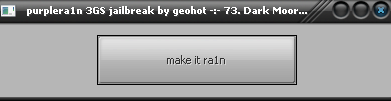
Step 2) Run the purplera1n file that you downloaded from the requirements section. You will see this screen on Windows:
or this screen on OSX:
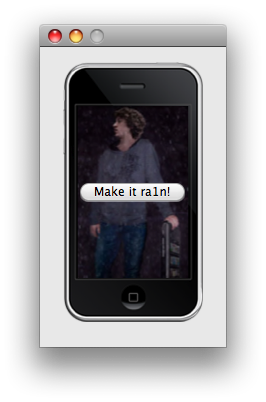
Step 3) Click “make it ra1n”. It will respond with “waiting for reboot”. Your iPhone will now reboot into recovery mode and you should see this image on your iPhone screen:

If you do not see this image and instead see the cable connecting to iTunes, wait 1 minute. If it stays that way then this did not work and you can assume you have to repeat the process. It’s ok to start it while you’re in recovery mode. It will just go right to the image above. If not, close purplera1n and repeat step 2 & 3. If you cant get past this, see troubleshooting.
Step 4) After a couple of minutes, your iPhone will reboot and you will see a new app with a blank icon called Freeze on your iPhone screen:

Step 5) Now we want to get Cydia installed. We’ll do this over the network. Make sure you have wifi or very stable 3g before running this step. When you do, run Freeze.
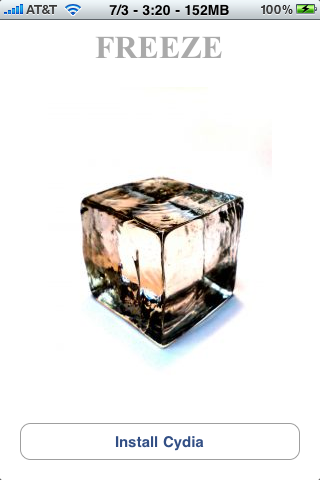
Step 6) Click “Install Cydia” and wait for it to download and install.
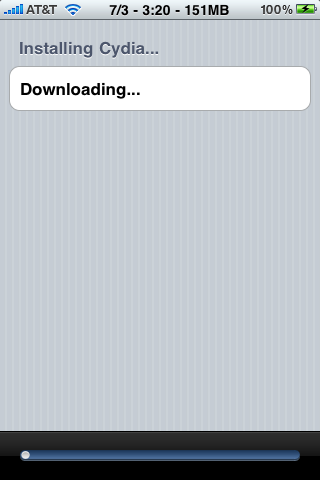
Step 7) When the install completes, close Freeze and reboot the iPhone.
Step 8) You now have a Cydia icon.
Step 9) Open Cydia and allow it to reorganize your apps (this eliminates the need for BossTool). After this, perform the essential updates or do a complete update.
Step 10) We no longer need the Freeze icon so let’s remove it. (Note: I do not recommend that we hide this icon using SBSettings as you may have this problem after you restore). Load Cydia and install “CyDelete”. Use the cydia search. By the way, notice how blazing fast Cydia runs on the 3gs! Wow!
Note: if springboard spins forever after the “restart springboard” just hold home and power until the iPhone shuts off, then power it back on. This seems to happen sometimes on 3.0 the first time mobile substrate installs. It all works after.
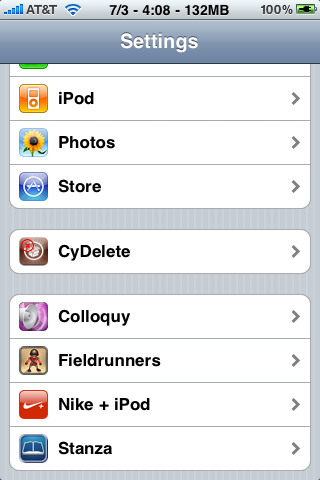
Step 11) Enable non Cydia deleting in CyDelete. Launch settings app and navigate to the bottom of the first page to find the settings bundle:
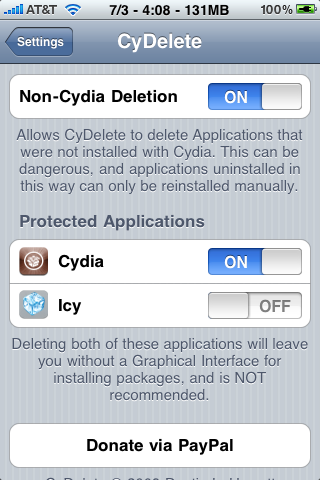
Step 12) Tap CyDelete and enable “Non-Cydia Deletion” (the top option).
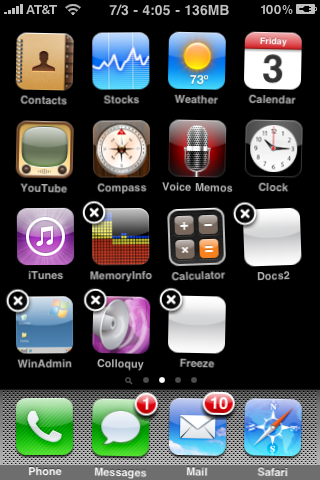
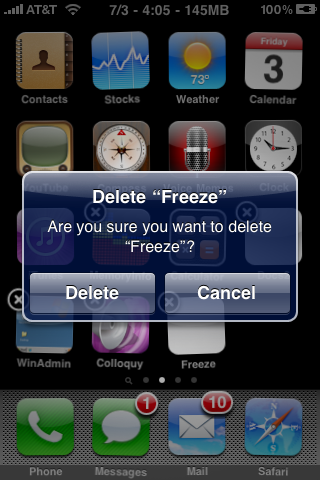
Step 13) After the springboard reloads, hold any icon to get into wiggle mode and remove Freeze:
Step 14a) Optional. You no longer need CyDelete. You can uninstall this in Cydia now. I recommend keeping it however. It’s a very easy way to uninstall Cydia apps and you now have enough memory in your 3GS that you will not notice any overhead having it.
Step 15) Optional if you want to unlock now, you should be able to install Ultrasn0w. See my ultrasn0w guide.
Troubleshooting:
I would not be surprised if you’re in this section. This process was a nightmare for me. It took me many tries and several different computers. Here are some problems and possible solutions.
Purplera1n crashes as soon as you tap “make it ra1n”. Your Apple mobile device service is not running. On Windows press windows + r and type “services.msc” into the run box and hit enter. Then locate the Apple Mobile Device service and right click, say “start”.
Continue Reading ..>>



 FlowChat is by far the best internet chat (IRC) client for the iPhone and iPod Touch. I have personally been testing this IRC app for months. It feels more like a real desktop client than a mobile IRC clients. It’s really good. FlowChat combines a gorgeous interface with an extensive feature list that rivals that of most desktop chat clients.