ShakeToUnlock allows you to unlock your iDevice by shaking gestures, even if your device is sleeping. Or just undim it, which is great for LockInfo or Cydget users. Many users have requested such an solution and unlike others ShakeToUnlock works even when the screen is off; unlock whenever you want. It’s utlizing technology some great technology. A [...]
Continue Reading ..>>SBRotator is out! “SpringBoard Rotator” does what iPhone should be doing from the beginning LoansOnlineUSA.net! It rotates the whole SpringBoard according to your device’s orientation! You flip it to left or right, you get LandScape SpringBoard! The so-wanted addon is now available and compatible with most of the springboard-tweak applications, such as Infiniboard, Infinidock, Iconoclasm, [...]
Continue Reading ..>>It appears that Apple has released iTunes 9.1. If you are on windows, I would avoid using this. It seems to have problems with blackra1n because blackra1n uses a specific DLL that has changed. In general, I recommend never updating iTunes. I have v8.0 still and am quite happy not having to update that horrible piece of software.
Anyways, here is a quick summary:
1) Itunes 9.1 is out
2) The new dll will mess up blackra1n running in windows. If you have a tethered jailbreak, you would be unable to rejailbreak after rebooting the iphone with blackra1n. I believe you can use redsn0w but there may be some issues with using redsn0w on an already-blackra1ned device.
3) There may be sync problems with it until you reboot.
4) Redsn0w seems OK with iTunes 9.1. So if you’re using that you should be OK.
5) OSX iTunes seems ok. Problem is blackra1n + windows only.
The old saying applies. If it’s not broken don’t fix it. If you have already updated itunes, you can get an old version here. Your steps to install an old version are a bit tedius:
1) Uninstall the current itunes
2) reboot
3) Install new itunes
Note: it is probably also possible to locate the old itunes dll files and put them in the blackra1n folder and blackra1n would probably work again.
Continue Reading ..>> Note: We just released activator v1.3. With this version, you can select your activation method(s) for SBSettings if you wish to change it to something other than swiping the statusbar. Just don’t get into a situation where you disable it entirely!
I have updated SBSettings toggle pack to v3.0.6. This fixes an issue from last night’s update where if you had disabled EDGE using the EDGE toggle then updated with EDGE turned off, there was no way to reenable it because the new Data toggle uses another method to enable data. In addition, I have added back the EDGE toggle by request. I guess the thing actually did work for some people. Go figure. Now you can choose which one to use. No need for both. Pick one and go with it. If EDGE works for you, use that as it behaves much better. If not, Data should definitely work although is much slower on reenable plus if you have a sim pin, data toggle will require you to reenter your pin since it resets carrier connection.
 Bosspaper got another update tonight. I have added a button at the bottom of the configuration app to choose your aspect ratio. Your choices are:
1) Stretch – stretches the image to fill the screen regardless of aspect ratio. (This is how bosspaper has been all along.
2) Zoom – Keeps aspect ratio and fills the screen. It will possibly crop off part of the image if the image is not the right size.
3) Fit – Keeps the aspect ratio of the images but if the image does not fill the screen you may have black bars above and below the image.
Continue Reading ..>>I have added a special repo for beta testing SBSettings. In it, I have put an update to SBSettings and SBSettings toggles. I am looking for testers that are interested in testing things out. However, there are some rules you must agree to before doing this:
1) This is a beta repo. It should never be given out. It must never appear in any “all sources” packages. As soon as that happens, the repo will be removed. Steffwiz / pwncenter already *ruined* my last beta repo.
2) If you install anything from this repo, you are not going to look for tech support. You will need to be able to send syslogs if there are any springboard crashes or major problems. You can do so with logmailer. If you do not know how to do these things, please do not install the beta repo.
3) If there are issues, you must be capable of describing them well with details and willing to work through them to solve the problems rather than just reverting to an old version with “it didnt work”.
4) As this is beta software, I cannot guarantee its stable (although its working well for me and initial testers). Therefore, if you have a 3gs with no 3.1.2 SHSH stored in Cydia, I suggest you do not bother with the beta tests as long as there is no 3.1.3 jailbreak out.
Ok now that has been said, if you are interested in testing and helping out, please add the repo at this address: http://thebigboss.org/betarepo
Whats new so far:
- Added app sorting in hidden icons and dock applications section of more app.
- Added ability to switch to max 2 rows. This keeps smaller window for those that want it. Find the option in extras in more app. On firmwares 2.x max of 8 toggles would be the limit. On 3.x you would be able to scroll pages.
- Added “App Folders” section to the more app to get the path to a specific app folder. Useful for trying to fiddle with appstore apps that have cryptic locations.
- Added Activator support. You must have rpetrich’s activator v1.3 or newer. Also beta. We are waiting on the thumbs up from the sbsettings beta test and then this all goes live.
- Removed EDGE toggle which only worked on 2.x devices and replaced it with DATA toggle that should work on all devices.
ILogManager Basic 3.1 is out. Both trial and full versions are available at Big Boss repo. The users, who are all using 3.0.1 are advised to update to the new version immediately. In this new release, we addressed, critical memory and table scrolling issues with the contact images. Real cool news: As we announced in [...]
Continue Reading ..>>It looks like Geohot has announced that he has a working jailbreak for 3.1.3 which he plans to release on the next major release (3.2 or iPad or such, not 3.1.3). The really good news for us all is that it is untethered which means all of you out there with the new tethered bootrom will be able to get a real jailbreak in the next few weeks. Of course we will announce here when it is out.
For more info and a funny video demonstrating it, you can view Geohots blog.
Of course, it won’t be released for 3.1.3. Since 3.1.3 is so worthless, there is no point giving Apple another exploit to close until after the next release is out that is actually worth something.
Continue Reading ..>>
23
Mar
Updates to SpringSorter, SnapTap, SBSchedule and SBSettings toggles…
Author: openhebrew // Category: AppsI’m glad to announce the recent updates of most of my software for the iPhone OS: SBSchedule allows you to make profiles according to SBSettings toggles and activate them at given times or on the fly (via a configurable shortcut). With the latest update you can also set your device’s backlight as well as the [...]
Continue Reading ..>>ScreenDimmer 1.30 has been released. It now allows you to disable locking while the device is charging/docked and provides an option to disable locking directly after respring/reboot. There are also a few improvements/fixes in the new version. Here is the changelog: – added option “Don’t lock while Charging” – added option “Don’t lock after Respring/Reboot” [...]
Continue Reading ..>>Today, developer TheZimm has released a very cool free task switcher called Circuitous. Mainly for 3gs users that have enough memory to background apps, Circuitous + Backgrounder make a fantastic team. Current version requires you to install backgrounder manually, but the next update will auto install it for you if its not installed.
As you may know, there are severe limitations imposed on AppStore apps. One of these is “no background processes.” This means that if you have an app, such as a music streamer, and you press home to do something else such as check your email, the app is closed out. You are disconnected. Your music stops playing.
Backgrounder is an attempt to fix this. Backgrounder allows you to select an app that you want to allow to run in the background. Then when you press home, that app will keep running. Perfect for an IRC app (try flowchat + backgrounder) or such that you do not want to get disconnected everytime you tap the home key. This adds critical functionality that you cannot get unless you jailbreak! On 3gs, you have plenty of memory to use this fully!
Circuitous is another launcher / manager that goes along with backgrounder to let switching tasks be easy and elegant:
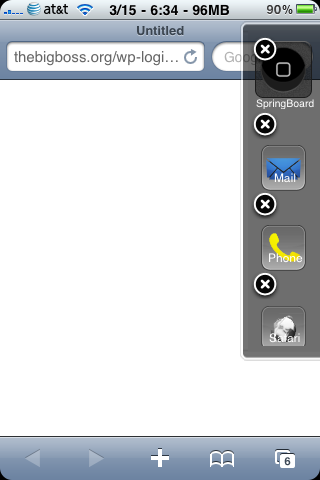
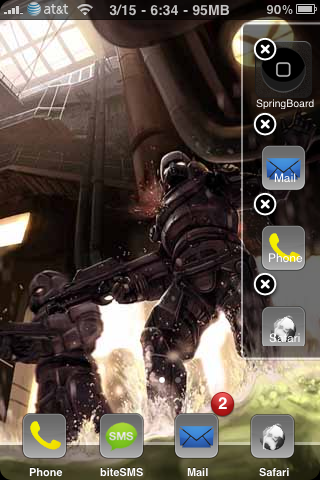
With this you can background and kill apps easily. While composing an email, quickly look something up on the web without closing your email program. Uses are endless.
Continue Reading ..>>Hello every one, good news to all of you!!! We received some complains that IlogManager Basic 3.0.1 is using much RAM of 2G and 3G IPhones. In the ground level testing we observed that, if the IPhone has more contacts (some one told that he has 2K contacts in his address book ) and each [...]
Continue Reading ..>>
15
Mar
Getting “Warning: You are running low on memory” pop-ups? The Fix.
Author: Pico // Category: Apps, General, Jailbreak, News-
Many users, including me, have gotten the iPhone System pop-up: “Warning: You are running low on memory…etc” in the past few days. Unfortunately for me, my phone did a hard crash when my wake-up alarm went off this morning and I had to do a full restore (I was planning on upgrading from 3.0 anyways).
The culprit? Rock App
Why? It seems that Rock is not clearing out the log\cache file, so it constantly grows larger, indefinitely.
Solution.
- SSH into your phone or use iFile\Diskaid and locate /var/mobile/Library/RYP/logs
- Delete rockapp_{date}.log
Some users have indicated that their log files have totaled from 1gb to over 8gb in size!
I have not confirmed this, but a user told me that going into Rock and clicking “Clear cache” will fix this problem.
I am not sure if there was a date bug, but it seemed that it has recently hit everyone that has Rock (and extensions) installed.
Update: kwickone has stated that a Rock update is out that will fix this problem. Update Rock to see if the problem is resolved, if not, delete the log file as mentioned above. I had to fix my friend’s phone and I could not even launch Rock. After deleting the logfile, rebooted, everything was back to normal
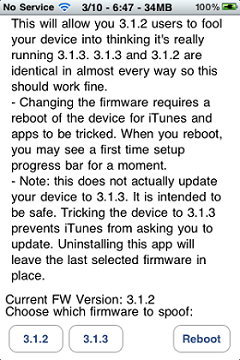
Continue Reading ..>> I have removed the firmware 313 spoofer from Cydia and instead placed a firmware 313 spoofer *app* into Cydia. This time, rather than rely on cydia to copy the files, I have an app that will let you load it and toggle the firmware from 3.1.2 to 3.1.3. Note that it does require a reboot after toggling in order for this to take effect. In hindsight, having Cydia copy the files was a bad idea because it seems Cydia has crashed on some installs or the scripts have not completed for some reason causing problems on uninstall. The new app will solve that as it removes all the scripts from cydia.
The app still just edits the file at /System/Library/CoreServices/SystemVersion.plist, which you can manually edit if you so choose.
If you installed the previous version of firmware spoofer, I suggest you do not remove it (ever) as there was a bug in the uninstall script that could remove your firmware plist. Just use this new app instead to select which firmware you want. Selecting 3.1.2 and rebooting is equivalent to uninstalling the old tweak
App is basic but functional:
And some quick comments to some questions I keep getting:
1) No, this does not actually update your firmware to 3.1.3
2) No this does not impact tethering tweaks or other tweaks. It just changes the *reported* firmware version
3) No this does not break your unlock or cause “no service”
Remember that you have to reboot for this to take effect even though the settings app shows the version change immediately.
Final note: if you want this to remain permanent you can uninstall the app after selecting the firmware so you don’t have to have the icon. The last firmware you have chosen will remain. If you wish to change it later you can always reinstall the app and change it again.
Continue Reading ..>>Edit: Today (March 10) I have removed this in exchange for an actual app that does the same thing but does not rely on cydia to copy the files. See “Firmware 3.1.3 App” in cydia, which is probably much safer and should fix / repair the problems some of you have had.
Today I released a firmware spoofer called “Firmware 3.1.3″. This of course doesn’t really update you to firmware 3.1.3. But since firmware 3.1.2 and 3.1.3 are so identical minus the jailbreak, it is close enough. If you install this then reboot, iTunes will even show you as running 3.1.3 and will stop bugging you.
This is perfect for setting up someone else’s iPhone that may accidentally update to 3.1.3 because it prevents iTunes from hounding you or prompting you for an update.
This also allows all those iTunes 3.1.3 only apps to install and work. I believe there are no actual API changes between iTunes 3.1.2 and 3.1.3, therefore this should allow all 3.1.3 apps to run.
Note: This does not really update you to 3.1.3. Instead it just tricks your device into thinking you are updated by updating the file at /System/Library/CoreServices/SystemVersion.plist. In general, I think firmware spoofing is a bad idea. But this is a unique time where many users are accidentally updating and losing their jailbreak. Therefore, this package will help prevent that.
Only supported on 3.1.2 since 3.1.3 and 3.1.2 are virtually the same. If you want to spoof firmware other than 3.1.2, you can manually edit the file listed above (assuming you know how). But do not expect everything to work fine doing this. Some apps require the newer firmware.
Uninstall to revert to firmware 3.1.2.
Continue Reading ..>>Take full control of your SpringBoard! Two tweaks from chpwn, the recently released Infiniboard and Infinidock, allow you to scroll your home screen in ways not seen since firmware 1.x — or ever before. Both are available in the Cydia Store now! Infiniboard lets you scroll each page on your home screen up and down, [...]
Continue Reading ..>>